VFX Effects 3D Houdini

Categories: VFX
Wishlist Share

About Course

The objective of the  Course in VFX Effects 3D Houdini – Officer  Side  FX  is that you know the processes and procedures  work to apply  in the operator position effects  from an angle not seen so far, revealing the secret of the techniques applied in large productions.  
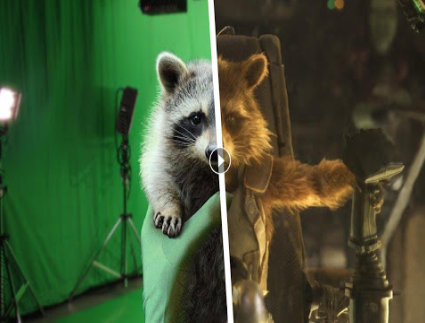
In this Course in VFX you will  implement  all kinds of visual resources  that are increasingly present in any production: explosions, fire, magical appearances, etc. At the end of the training program, you will  know how to make special effects  to visually enrich any story. 

In addition, you will learn how to use  Houdini , the most widely used application in the sector for its wide range of effects and its intuitive graphical interface that seamlessly integrates 3D with the real image and allows professional VFX compositions to be made. You will also be trained in the management of FX tools and utilities, such as  Nuke , Real Flow and Maya . 

Show More

What Will You Learn?

  • Graphic artists, students and professionals in the 3D animation sector who wish to specialize in the world of high-level special effects.

Course Content

Unit 1. General Introduction
A little history Who's who in a production. Workflow & Pipeline Material in the VFX the light and its properties The camera The color in the VFX The digital image in the VFX Data management in VFX

Unit 2. General Competences with Houdini
Introduction to the program Versions Understanding Houdini Identifying Nodes in Houdini Bases of proceduralism Interface

Unit 3. Conventional Modeling in Houdini
Primitive types Points and vertices Nurbs curves and surfaces . Conversions Box up modeling and retopology Component editing Transformation nodes Snaps Importing geometries Exporting geometries Attributes Hierarchy between objects

Unit 4. Procedural Modeling
Referenced parameters Variables Introduction to Digitals Assets

Unit 5. Shading and UV’s
Create and edit UV´s Working with projections Mantra shading Principled shader Custom shaders Shader handling from attributes Normal mapping Vector and displacement mapped

Unit 6. Photogrammetry Techniques
What is it Photogrammetry applied Applications Optimal material to develop a model Agisoft Metasshape Open source alternatives LIDAR Material Indoor model case study Outdoor model case study

Unit 7. Animation by Keyframes
Timeline Conventional animation Animation channels Auto key Edit keys and channels Flipbooks Scoping parameters Key types Curve editor Interpolation Time formats Procedural animation Retiming

Unit 8. General Rendering Competencies
Render engines. Types Output formats and sizes Arnold at Houdini Introduction to Arnold's lights Properties of a camera with Arnold How to use an HDR on Arnold Light Filters & GOBOS The importance of samples when using textures Arnold Materials Miscellaneous nodes Stand Ins The ASS format Export and import Batch Render

Unit 9. General Competences with Nuke.
Environment and preferences Configure input sources. Relative and absolute routes EXR Image Workflow Gizmos Depth of Field Motion Blur . Vector 3d data flow between Nuke and Maya / Houdini Position Pass Rotoscopes Chroma Color spaces Color grading Geometric lens distortion Camera tracking Exportation and importation Workflow with a real plane

Unit 10. HDRI
Necessary material Types of HDRI Exposition Ratio Practical example

Unit 11. Advanced Houdini. Part 1
Houdini engine . From Houdini to Maya Houdini Expressions illumination

Unit 12. Advanced Houdini. Part 2
Cameras SOP. Shader Operators Mantra thoroughly

Unit 13. RBD simulations. DOP’S
Assets vs. Passives Fracturing techniques and methods Constraints Forces Input, output and simulation cache RBD simulation types Mix animation and simulation Optimize simulations Cache

Unit 14. Particle Simulations. POP’S
Emitters Working methods Controlling speed Particle systems Apply forces Reactions to forces Reacting to events Instances and render Sprites Wires simulation Fluids Add densities Manipulate a fluid through forces

Unit 15. Fluid Simulations I. Liquids
Fluid particles Fluids from objects Tank simulation Simulation techniques from sculpted particles Creating White Waters Effects

Unit 16. Fluid Simulations II. Volumetric / PYROFX
Creation of fire effects Create explosions Parameter management and microsolvers Specific shading How to render in mantra and Arnold Export in VDB. Considerations

Unit 16. Fluid Simulations II. Volumetric / PYROFX
Creation of fire effects Create explosions Parameter management and microsolvers Specific shading How to render in mantra and Arnold Export in VDB. Considerations

Unit 17. Ocean Simulations.
How to use Flat Tank Generation of waves and ripples Splash effect generation How to use Wave Tank How to use Beach Tank

Unit 18. Simulation with Vellum
What is Vellum? PBD systems Simulations of tissues Simulations of hair Simulations of bodies soft Simulations with objects of pressure Granular simulations

Unit 19. Hair and Fur FX.
Add hair draw hair Tools for styling hair Animation tools for hair Simulate hair Shading and rendering

Unit 20. CROWDS
Preparing states Agents. Importing characters and animations Threadmill vs. animation Progressive animation Populate . Agent multiplication Terrain simulation and trajectory tracking Simulations Ragdolls Collision layers